Home Automation: Installment #1
I’m on a tear to automate our home. My interest in doing so mostly results from innate curiosity. For me, there’s something inherently fascinating in a computer switching on a device. The core of my automation solution is Home Assistant: a free, open-source, community-driven platform that acts as a central hub to control, monitor, and automate devices. To cut the risk of being charged with what my sister-in-law calls a “boring foul!” I’ll keep the details of Home Assistant out of this blog. Here’s today’s dashboard of what I monitor – I continue to expand it.
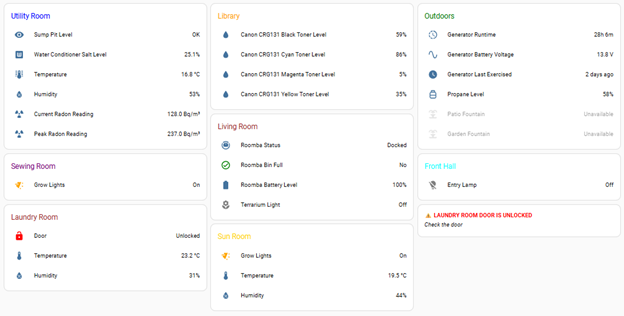
I mounted an older-model Raspberry Pi and a computer monitor in a high-traffic area on the ground floor. Running Chromium in kiosk mode, I can easily check the dashboard without consulting my desktop PC. My son was home on the weekend and saw the setup for the first time. I got a text from him a day later, part of which said:
Also, Shelby [his girlfriend] and I have decided that your Raspberry Pi display should show your outstanding phone notifications.
Now, I’m notorious for dumping my cellphone when I get home and not looking at the phone until days later. Texting me isn’t your best option if you want a real-time response. Shelby once texted me on a Friday, and I didn’t see her message until the following Wednesday. My response to my son: “LOL.”
But as I thought about it that evening, I wondered: Is there an integration available between a smartphone messaging application and Home Assistant? A quick Google search revealed that, indeed, there is! The next morning, I went to work with Gemini (Google’s AI assistant). To forego a boring foul, I’ll skip details of how I set it up. I’ll just stick to the workflow.
A new text arrives for me on my phone. A sensor on the phone triggers Home Assistant to pop up a conditional card on the dashboard.

I see the card and head over to where I dumped my phone (after all, I look at the dashboard constantly during the day!). As soon as I unlock my phone, a sensor tells Home Assistant to remove the conditional card from the dashboard. Voila!
Now, I do have to run the Home Assistant companion application on my smartphone. And I have to be connected to our local area network. I don’t usually connect to the network as part of my usual workflow when I’m home: I try to minimize battery use. Time will tell whether I keep the companion application running and WiFi turned on. But as a “I wonder if” automation, I was delighted when I first saw it work.
That’s enough blogging: time to bring another sensor online.